


Answers
Installing a Maintenance Update
Step 1: Open Reunion 14.
Step 2: From the menu at the top, select Help > Check for Updates.
Step 3: Follow the messages on-screen.
If the above method proves to be problematic, please install the most recent build of Reunion 14 manually by following the steps below.
Manually Installing the Maintenance Update
Step 1: Be sure to quit Reunion 14 if it is running.
Step 2: Click here to download the most recent build of Reunion 14.
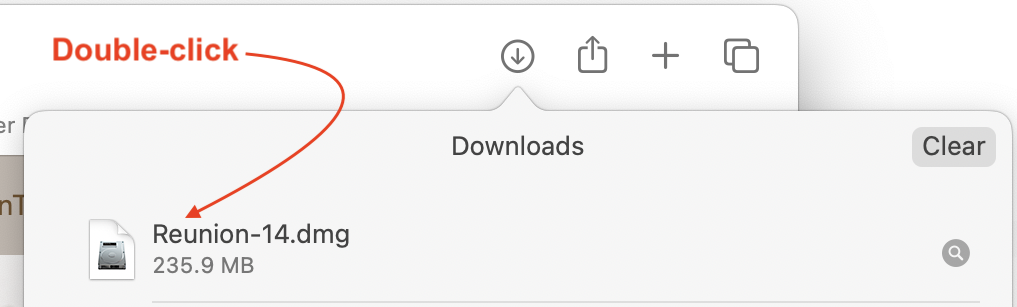
Step 3: After the download finishes, double-click the downloaded Reunion14.dmg file to start the installer.
Step 4: Follow the prompts to drag the Reunion 14 app onto the Applications folder.
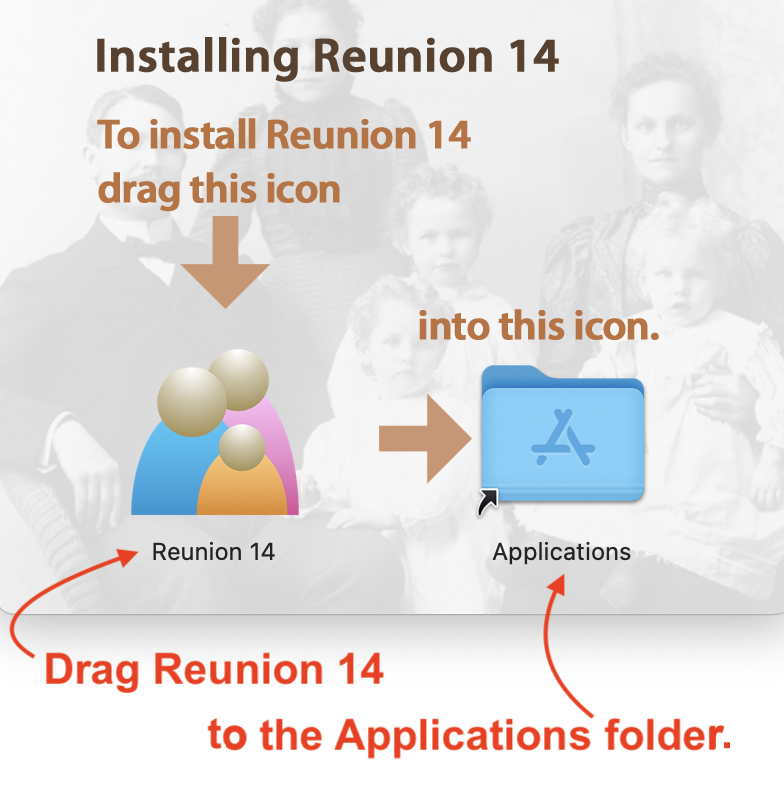
Note: Be sure to allow the newly downloaded build of Reunion 14 to "Replace" the existing Reunion 14 app in Applications. (I.e., do not select the option to "Keep both.")
Step 5: Launch Reunion 14.
All you're doing is updating the Reunion 14 application. Your family file data is stored elsewhere and is not affected.